eCalendar - Daily Planner
- 4.7
- Rating
- 100.00K
- Installs
- Free
- Price
 Analysis by App-foxy
I started using eCalendar when I wanted a calmer way to keep track of ordinary commitments: appointments, errands, personal plans, and the small tasks that are easy to lose in a crowded week. It is a free photography-category app from Shenzhen Fujia Technology Co., Ltd., although its practical role is much closer to a lightweight personal calendar than anything related to editing or sharing photos. The appeal is straightforward: it aims to keep planning focused instead of turning a simple date reminder into a complicated management system.
That simplicity is also the key to understanding it. I would not choose this app for a large team, a detailed project, or a calendar workflow that depends on deep integrations. I would choose it when I want to open a calendar, understand what is happening, and move on. After using it as a daily planner, I found that the most important question is not whether it has an impressive number of options, but whether its direct approach matches the way you actually organize your time.
From a messy week to a usable daily plan
I begin with the practical change a simple calendar can make: turning scattered commitments into something I can scan and act on. This section looks at how I would capture plans without overbuilding the schedule, and why a clear daily view can be more useful than a feature-heavy system. From there, I’ll consider how the app feels when a week gets busy.
You May Also Like

 AccuWeather: Weather Radar
AccuWeather Review: A Quick, Clear Forecast for Everyday Decisions
For everyday plans, the best forecast is the one you can understand quickly. AccuWeather makes rain timing, radar, and local conditions easy to act on, with a few trade-offs.

 Hill Climb Racing
Why Hill Climb Racing Still Turns Crashes Into One More Run
A tiny car, a bumpy hill and one more upgrade: Hill Climb Racing keeps resurfacing because its simple chaos makes every near-miss feel personal.

 AliExpress - Shopping App
AliExpress Makes Global Shopping Feel Personal, but Shoppers Bear the Risk
AliExpress turns a global marketplace into a pocket-sized discovery engine. Its reach is useful, its shopping loop compelling, and its trade-offs easy to miss.

 Lords Mobile: Kingdom Wars
Lords Mobile Is a Kingdom-Building Routine, Not a Quick Match
A case-by-case verdict on the building, battles, device demands, and social commitments that make Lords Mobile rewarding for some players and exhausting for others.

 PDF Scanner app - TapScanner
TapScanner Makes Paperwork Easier to Capture, Check, and Share
TapScanner makes scanning with a phone feel less like a rescue operation and more like a dependable step in getting work done. Its capture tools are useful, though not flawless.

 Block Blast!
 Shows How Much a Puzzle Game Can Leave Out
A quiet grid game shows why puzzle players increasingly value instant clarity, repeatable skill and low-pressure play—and where the genre still needs to catch up.
More From Our News Desk
View All News


Starting with the real problem
A typical planning problem does not begin with an empty calendar. It begins with information scattered across conversations, notes, memory, and last-minute changes. Someone sends a message about an appointment, a family member mentions a school activity, and I remember an errand while already thinking about something else. The first useful job for a calendar is therefore not decoration; it is giving those loose details a reliable home.
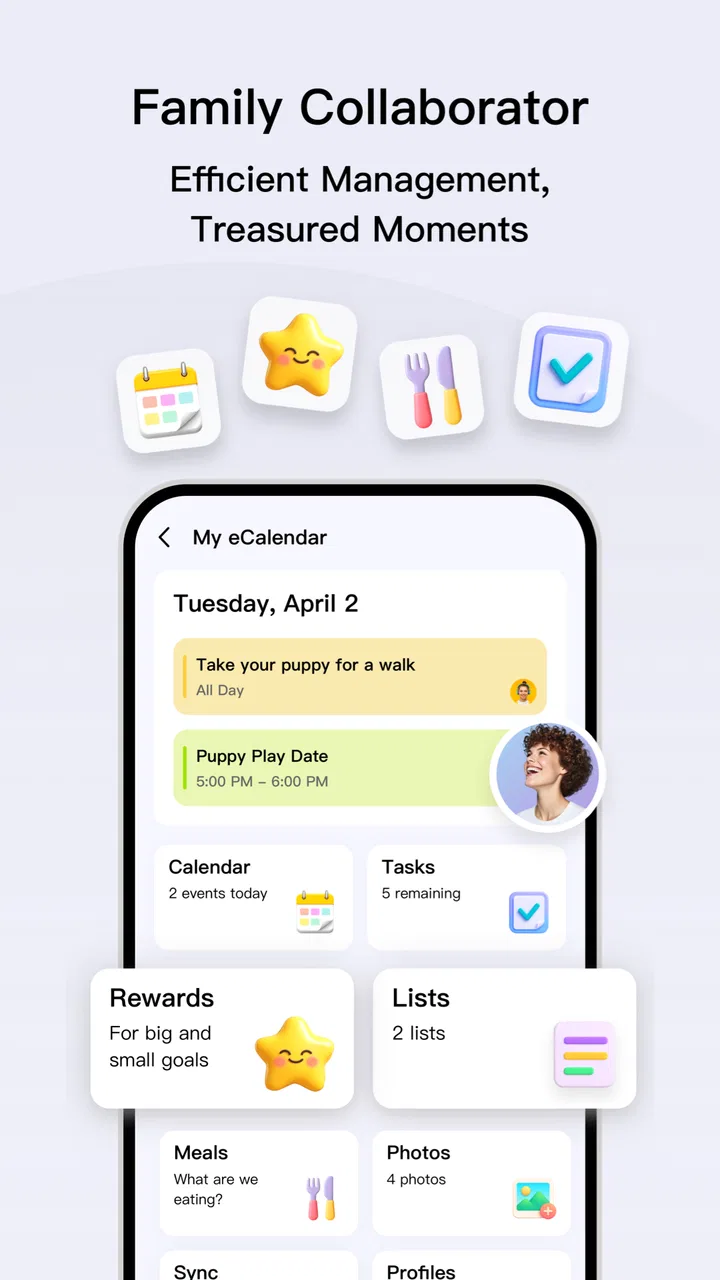
eCalendar works best when I approach it as a capture tool first. Instead of trying to design the perfect schedule, I add the commitments that would cause trouble if forgotten. That might be a visit, a bill-related reminder, a pickup, or a personal deadline. The focused layout makes this process feel less demanding than using a full productivity suite, especially when I only need a clear record of what is coming next.
The app is suitable for Everyone, and its minimum operating-system requirement is Android 7.0. That makes it approachable for people who are not using a recent phone and do not want to replace their device just to maintain a basic calendar. It is also free, which removes the usual hesitation around trying it as a secondary planner or a simple replacement for a more crowded calendar application.
Entering an event without overthinking it
My preferred workflow is to add an item as soon as I know about it, then make the wording specific enough to be useful later. “Appointment” is less helpful than “dentist appointment” or “collect repaired laptop.” This is a small habit, but it matters because a simple calendar depends on the quality of the information I put into it. The app does not magically turn vague thoughts into an organized day; it gives those thoughts a visible place.
I also find it useful to separate an event from a task in my own thinking. An event belongs to a particular time or occasion. A task is something I need to complete, but it may not have a fixed appointment. When I use the calendar for both, I keep the wording action-oriented for tasks and location- or activity-oriented for appointments. That makes the daily view easier to scan and reduces the chance of treating every line as equally urgent.
The practical strength is speed of understanding, not feature overload. I can look at a day and quickly identify what requires my presence and what simply needs attention. For a personal schedule, that distinction is often more valuable than a long list of advanced controls that I would rarely touch.
Building a day that can actually happen
Once the important items are entered, I use the calendar as a reality check. A day can look manageable when viewed as isolated commitments, then become impossible when travel, meals, preparation, and recovery time are considered. A useful calendar review therefore happens after the entries are added, not only before them. I look at the order of events and ask whether the gaps are genuine working time or merely time I have mentally spent twice.
This is one of the less obvious benefits of a focused calendar: it encourages me to see the shape of the day rather than maintain a long, abstract list. I am less tempted to add every idea immediately when the schedule is visibly crowded. In practice, that helps me postpone nonessential tasks instead of creating a plan that looks productive but cannot survive normal interruptions.
For a household routine, I might enter a morning appointment, a midday errand, and an evening commitment. The useful outcome is not just remembering each item. It is noticing that the errand belongs between the other two, or that it should be moved to another day because the route is inconvenient. A calendar becomes valuable when it changes a decision before the problem occurs.
Using the app in an everyday handoff
One realistic scenario is a change to a family plan. I receive a message that a pickup time has moved, and I update my calendar immediately rather than trusting the conversation to remain visible. Later, when I check the day, the calendar becomes my working reference. If another person asks what the plan is, I can answer from the updated entry instead of searching through messages and trying to reconstruct the latest version.
This kind of handoff is where a personal calendar quietly earns its place. The app is not replacing communication; it is receiving the result of communication. I still need to confirm details with the other person when plans are uncertain, but once the arrangement is settled, recording it in one place prevents the conversation from becoming the only source of truth.
There is a useful discipline here: update the calendar at the moment a change is agreed, not when I think I will remember it later. That habit is more important than any visual style. A beautifully arranged calendar with outdated information is worse than a plain one that reflects reality.
Reviewing the result at the right moments
I get the most from eCalendar through short checks rather than constant monitoring. In the morning, I review the day to understand the order of commitments. In the evening, I look ahead and adjust anything that has changed. Before a busy week, I scan the upcoming schedule and identify days that need preparation. These checks turn the app into a routine instead of another place where information accumulates.
My advice is to avoid adding unnecessary detail just because a field is available. A calendar entry should answer the questions I will have later: what is happening, when it happens, and any detail needed to act on it. If I need a long project brief, a shared document or dedicated task manager is usually a better destination. eCalendar is strongest when the entry remains quick to read.
How it compares with familiar alternatives
Compared with a paper planner, the app is easier to revise when plans move. A paper page can still be pleasant for reflection, but crossed-out appointments and arrows become confusing after several changes. A digital calendar keeps the schedule cleaner and makes last-minute edits less frustrating.
Compared with a general note-taking app, a calendar gives time a more visible role. Notes are excellent for collecting ideas, but they do not naturally show whether three commitments collide on the same afternoon. When the main question is “what happens when?”, a calendar is the better tool.
Compared with a large productivity platform, eCalendar feels less intimidating. That can be a real advantage for someone who wants personal planning without learning a complicated system. The trade-off is that people who need shared calendars, elaborate recurring workflows, project dependencies, or extensive collaboration may find a dedicated productivity service more suitable. I would not select this app simply because it is simpler; I would select it because my schedule benefits from staying simple.
Where the workflow becomes less comfortable
The same focused approach that makes the app approachable can feel limiting when a routine becomes complex. If your planning depends on several connected projects, multiple collaborators, or rich notes attached to every appointment, a basic calendar view may not provide enough context. In that situation, I would use eCalendar as a personal overview while keeping the detailed work elsewhere, rather than forcing it to act as a complete project system.
There is also a human limitation that no calendar avoids: entering information takes discipline. If I leave plans inside chats, remember them only mentally, or fail to update a change, the app cannot protect me from an incomplete schedule. The best workflow is to treat it as the final destination for confirmed commitments, not as a substitute for paying attention.
Another trade-off is that a focused personal planner may not satisfy users looking for a highly customized digital workspace. Some people enjoy extensive labels, elaborate views, and connected services. If that is what makes planning motivating for you, a richer alternative may feel more rewarding. I prefer eCalendar when customization would become another chore.
What the current release means for everyday use
The current version is 1.41.0, and the app has been available since Jun 27, 2024. It has reached over one hundred thousand installs, with a 4.7 average from around three thousand ratings and more than five hundred written reviews. Those figures suggest that the straightforward approach has found an audience, but they do not replace personal testing: a good rating cannot tell me whether the workflow fits my habits.
For me, the strongest test is whether I can complete the full loop without friction: notice a commitment, record it, review the day, respond to a change, and finish with a schedule I trust. eCalendar handles that basic loop well when I keep my entries concise and my expectations realistic. Its value appears in repeated small actions rather than in a dramatic first impression.
Who should use it, and who should move on
I recommend it to someone who wants a free, uncomplicated way to organize personal appointments and daily plans, especially if existing calendar tools feel unnecessarily busy. It is also a sensible option for an older Android phone because the operating-system requirement is modest. People who prefer a clean schedule over a large collection of productivity features will likely understand its appeal quickly.
I would point a different user elsewhere: a team coordinating shared availability, a freelancer managing detailed client projects, or anyone who needs a calendar to function as a complete collaboration hub. Those workflows usually depend on more than a focused personal planner. The right choice is not the app with the longest feature list; it is the one that keeps the handoff from intention to action reliable.
My final workflow recommendation
If you install eCalendar, I suggest beginning with one week rather than importing every possible plan. Add only fixed commitments and genuinely important tasks. At the end of each day, check whether anything moved and update it immediately. After several days, you will know whether the app’s direct style helps you think clearly or whether you need a more connected system.
My overall impression is positive because the app understands a useful boundary: a calendar should make time easier to see, not demand that I become a full-time administrator of my own schedule. It is not the right answer for every planning problem, but for personal organization, its free and focused design can be refreshingly practical. If your goal is to turn scattered commitments into a readable daily plan, this is a tool I would comfortably recommend trying.
FAQs for eCalendar - Daily Planner
01What features does eCalendar - Daily Planner offer?
eCalendar - Daily Planner provides a comprehensive suite of features including task management, event scheduling, reminders, and synchronization with other calendar apps. It also offers a user-friendly interface with customizable views, such as daily, weekly, and monthly layouts, to help users organize their time effectively.
02Is eCalendar - Daily Planner available on both Android and iOS?
Yes, eCalendar - Daily Planner is available for download on both Android and iOS platforms. This ensures that users can access their schedules and manage their tasks seamlessly across different devices, maintaining consistency and convenience in their daily planning.
03Does eCalendar - Daily Planner support synchronization with other apps?
eCalendar - Daily Planner supports synchronization with popular calendar apps like Google Calendar and Outlook. This feature allows users to import existing events and tasks, ensuring all their important dates are consolidated in one place for easy management and accessibility.
04Are there any in-app purchases or subscription fees?
While eCalendar - Daily Planner offers a free version with essential features, there are optional in-app purchases and subscription plans. These paid options provide access to premium features like advanced customization, additional themes, and priority customer support, enhancing the overall user experience.
05How secure is my data with eCalendar - Daily Planner?
eCalendar - Daily Planner prioritizes user privacy and data security. It employs encryption protocols to protect user information and offers options for secure backups. Users can rest assured that their data is handled responsibly, with stringent measures in place to prevent unauthorized access.
Pros
- User-friendly interface for easy navigation.
- Customizable reminders for all events.
- Syncs seamlessly with Google Calendar.
- Supports multiple calendar views.
- Offers color coding for better organization.
Cons
- Limited offline functionality.
- No integration with task management apps.
- Ads in free version can be intrusive.
- Premium features require subscription.
- Lacks advanced scheduling features.

eCalendar - Daily Planner
Gallery